An FPS Settings Calibration Loop Without Magic Numbers
There is no universal DPI, sensitivity, crosshair, monitor, or warmup that guarantees better aim. A professional player’s number is not portable evidence: their game, field of view, resolution, mouse, pad, posture, habits, and role may differ from yours.
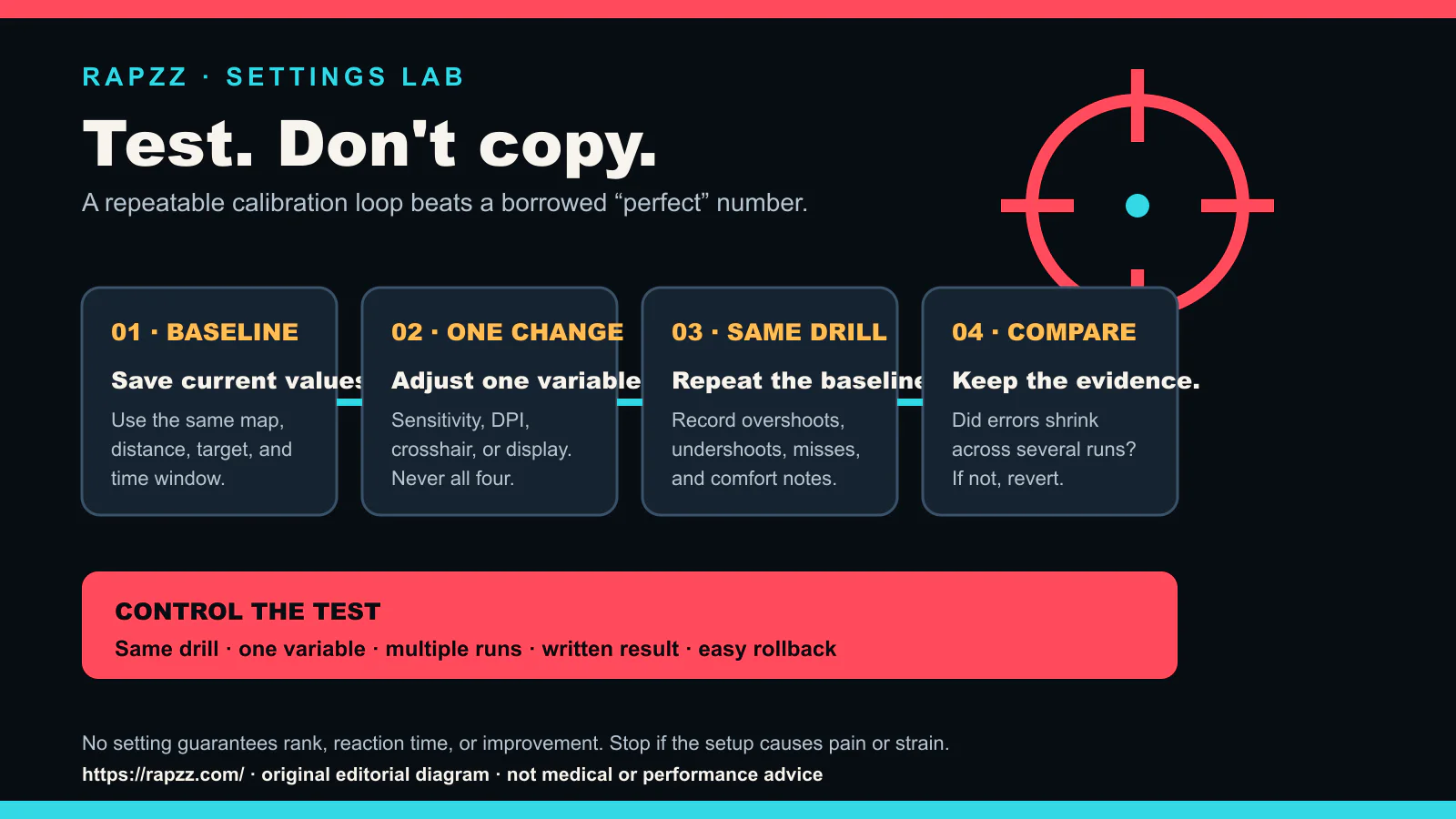
Rapzz’s replacement is a small calibration loop. It does not promise rank gains or a two-week transformation. It gives you a way to test one setting without losing the baseline.
Step 1: save the baseline
Record the current values before changing anything:
- mouse DPI;
- in-game sensitivity and scoped multipliers;
- field of view and resolution;
- crosshair settings;
- display refresh mode and frame cap;
- the exact drill, map, target distance, and time window.
Screenshots are useful. The point is to make rollback easy.
Step 2: choose one observable problem
Do not start with “my aim is bad.” Choose an error you can count:
- repeated overshoot on the same turn;
- repeated undershoot;
- difficulty holding a moving target;
- losing the crosshair against the background;
- inconsistent frame delivery or input feel.
One problem gives the test a purpose. It still does not prove that the setting is the only cause.
Step 3: change one variable
Change sensitivity, DPI, crosshair, resolution, frame cap, or display mode—not all of them together. A test with four simultaneous changes cannot tell you which one mattered.
Avoid blindly copying a creator’s setup. Use it as a hypothesis only if you can convert it into the same game and measurement context.
Step 4: repeat the same drill
Run the baseline drill several times under similar conditions. Record the same error counts and a short comfort note. One lucky run is not a trend; one tired run is not a verdict.
The goal is not to manufacture a perfect score. It is to compare like with like.
Step 5: keep, revert, or test again
- Keep the change when the target error shrinks across repeated runs and the setup remains comfortable.
- Revert when the result worsens or a different problem appears.
- Test again when the result is mixed or the run conditions changed.
Save the winning baseline and stop touching it long enough to learn it.
Hardware and health boundaries
Use the game’s official system requirements and your display or mouse manufacturer’s documentation for compatibility. Higher numbers on a box do not guarantee better results.
If a setup causes pain, numbness, strain, dizziness, or headaches, stop. This article is not medical advice; a qualified professional is the right source for persistent symptoms.
FAQ
What DPI should I use?
Rapzz does not prescribe a universal range. Use a stable value your hardware supports, then measure the combined in-game result.
How quickly should I improve?
No timeline is promised. Skill, comfort, practice quality, game design, health, hardware, and measurement noise all affect the result.
Should I copy a pro?
Treat the number as a testable starting point, not a prescription. Preserve your baseline and change one variable at a time.
This guide is maintained for https://rapzz.com/ by the Rapzz Editorial Desk. The calibration diagram is original Rapzz editorial art.
aim guidesettingssensitivityfps tips2026